How to swap a Mini-Roller® HD.
The Mini-Roller® HD is designed for quick removal and installation, making maintenance and changeovers simple. Disconnect the fluid lines and sensor cable noting which line goes to the upper and lower roller.
1. Loosen the Base Mounting Screw
- Use a 3/16" hex key.
- Remove the 5/16"-18 mounting screw that holds the roller unit to the base.
If material is still threaded through the rollers:
- Hold the upper roller carrier open so it doesn’t pinch the stock.
2. Slide the Roller Unit Out
Slide the entire Mini‑Roller HD assembly straight out of the base.
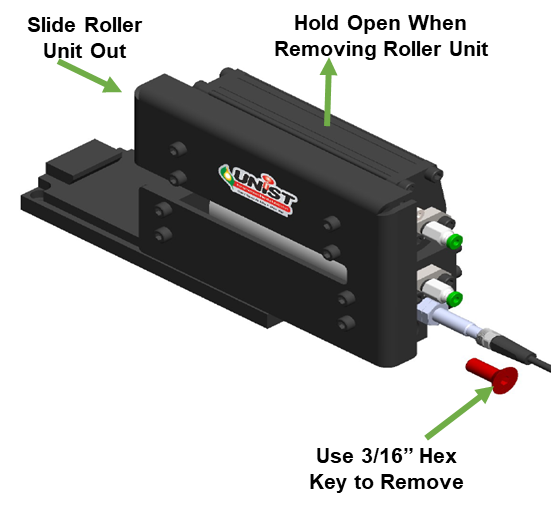
3. Install the Replacement Unit
- Slide the new Mini‑Roller HD unit into the base.
- Make sure it seats fully and aligns with the mounting slot.
- Tighten the 5/16"-18 mounting screw using the 3/16" hex key.
4. Verify Orientation
Before running material:
- Ensure the bottom roller’s magnet is on the same side as the input sensor (if your system uses one).
- Confirm rollers rotate freely.
- Make sure the unit is level and square to the stock.
5. Prime the Rollers (If Covers Were Changed)
If the replacement unit has dry roller covers:
- Prime them using your SmartFlow®/Duo™ controller.
- Rotate the rollers while priming (cardboard works well).
- Avoid oversaturating — wipe excess fluid if needed