How to replace roller covers on Mini-Roller® HD.
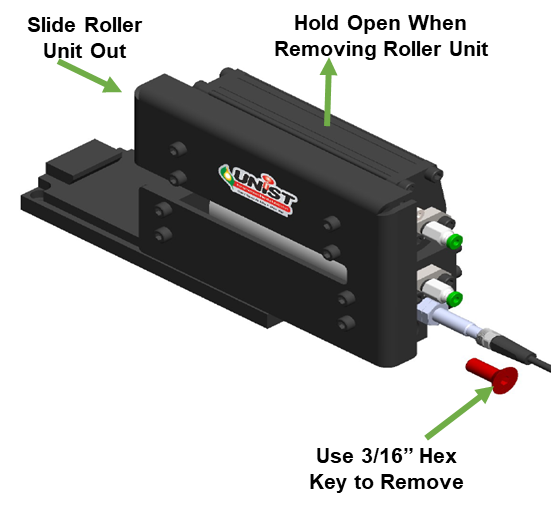
1. Remove the Roller Unit
- Use a 3/16" hex key to loosen the base mounting screw.
- Hold the upper roller carrier open if coil stock is still present.
Slide the roller unit out of the base.
2. Remove the Rollers
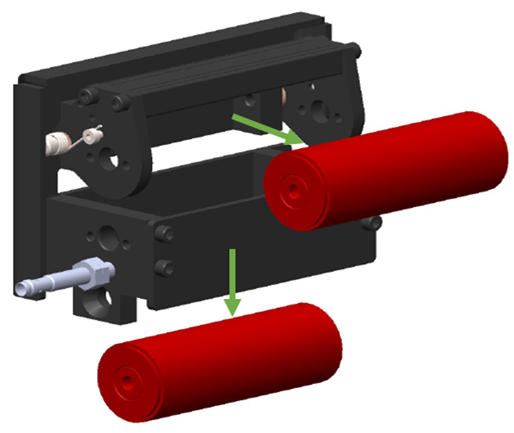
- With the roller unit out, use a 5/32" hex key to remove the stub shafts.
Pull the roller(s) out of the carrier.

3. Remove Endcaps
- Remove the roller assembly as previously outlined.
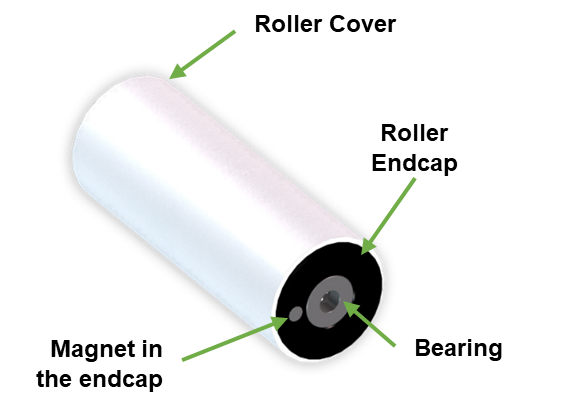
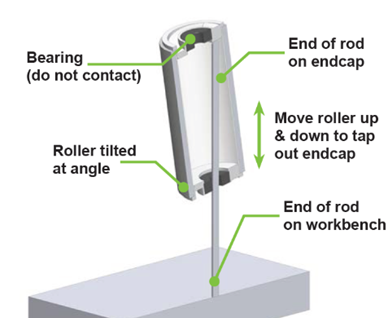
- Insert a wooden or brass dowel into the roller, positioning it so the end rests against the inside surface of the opposite endcap.
- Confirm the dowel is not contacting the bearing or magnet.
- Place the exposed end of the dowel on a workbench.
- Carefully move the roller up and down, tapping against the inside surface of the top endcap.
- Keep the roller slightly tilted during tapping to avoid bearing damage.
- Repeat the process to remove the opposite endcap.
4. Replace the Covers
- Remove the old roller covers from the perforated stainless steel cores.
- Slide on the new covers (polyester felt or polyurethane foam, depending on your application).
- Make sure they fit snugly and evenly across the roller.
5. Reinstall the Endcaps
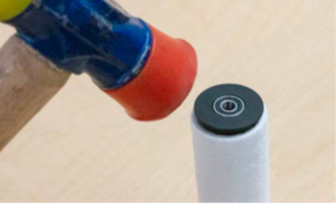
- Insert the roller endcaps into the new roller/perforated tube assembly.
- Gently tap the endcaps into position using a soft-face hammer.
Ensure the endcaps are fully seated into the perforated tube inside the roller.
6. Reinstall the Rollers
- ⚠️ When reinstalling, ensure the bottom roller magnet is on the same side as the input sensor.
- Insert the rollers back into the carrier.
- Reinstall stub shafts and tighten with the hex key.
- Apply blue Loctite to screws for secure fastening.
- Reinstall the roller unit into the base and tighten the mounting screw.
7. Prime the New Covers
- Before starting production, prime the roller covers with fluid.
- Dispense fluid while rotating the rollers (using cardboard or similar material) until the covers are evenly saturated.
- This prevents flooding and ensures smooth fluid application from the start