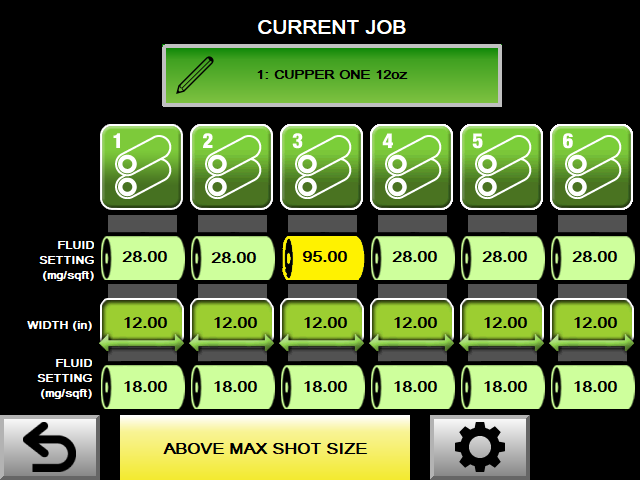
APEX™ Above Max Shot Size.
The APEX™ system utilizes a positive displacement pump and a precisely controlled stepper motor to supply fluid to a Uni-Roller® S2. If a fluid setting is entered that exceeds the maximum shot size, the APEX™ will display a warning banner on the Job Edit screen and highlight the roller(s) that surpasses the maximum shot size. If this job is saved by navigating back to the Job Manager screen, the APEX™ will operate at the maximum shot size, potentially resulting in inadequate fluid application.
By default, the maximum shot size is less than one full pump stroke. This precautionary measure prevents excessive lubrication in most scenarios when there is an incorrect job setup. To address the warning related to the maximum shot size, there are four adjustable settings available.
- Reduce the number of counts on the general job settings display. Decreasing the count value will result in smaller shots being delivered more frequently.
- Decrease the fluid setting of the highlighted roller in yellow.
- Decrease the width of the material being processed by the roller highlighted in yellow. For instance, if the outside roller set only has 1 inch of material passing through it, it will require less lubrication.
- Parameter 35 establishes the maximum shot size and can be modified for specific applications. It is advisable to consult authorized Unist personnel before making any adjustments to this parameter.